Block AI agents without managing lists
AI browsers, coding agents, MCP servers and autonomous agents appear every week. Keeping your own block list current is a job nobody has time for. Point your DNS at our filter, turn on one switch, and we keep the list current for you.
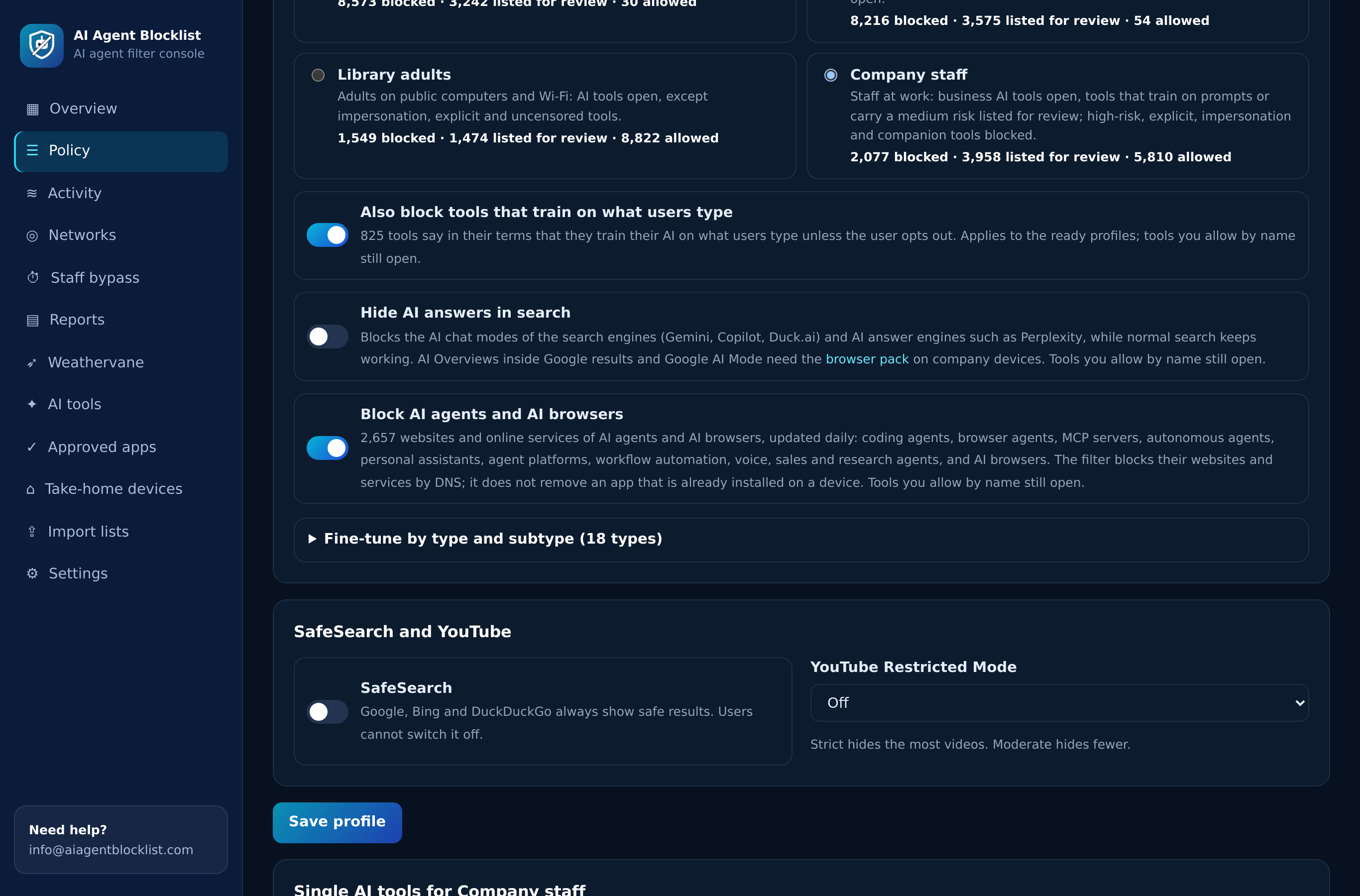
Simplified view of one profile's AI settings
AI Agent Filter (hosted): one switch blocks 2,600+ AI agent domains, kept current every day
A DNS filter we run for you, with the AI agents switch, the AI tools controls, 58 web categories, a dashboard and reports.
$99 a month or $990 a year for one organisation
Why a hand-made AI agent block list falls behind
Most teams start with a short list of AI browsers and agent sites in the firewall. Within weeks it is out of date, and nobody owns the update.
New agents every week
AI browsers, agent platforms and MCP hubs launch faster than a change board meets. Each one needs research before anyone can add it.
One tool, many domains
An agent often runs on several domains: the app, its sign-in, its back end and its downloads. Miss one and the agent keeps working.
Names change
Products are renamed, merged or moved to new domains. Old entries stay, new ones are missing, and the list drifts away from what people use.
Nobody sees the gaps
A hand-made list has no report. You learn that an agent got through when someone mentions it in a meeting.
Your own list
- Someone researches each new agent and its domains
- Entries are typed into every firewall or resolver by hand
- Updates wait for the next free afternoon
- Approved tools get caught by broad rules
- No record of which agents were stopped, or where
The AI agents switch
- New agents and AI browsers are added every day
- Each tool comes with the domains it needs to work
- One switch per profile, live in every office at once
- Tools you approve by name always stay open
- A report of every agent blocked, with its type
Gartner advised security leaders to block AI browsers for now. Its December 2025 advisory "Cybersecurity Must Block AI Browsers for Now" points to existing network and endpoint controls. A filter that tracks AI browsers for you is a practical way to act on it. Read what the advice means in practice.
How it works: three steps, no software on any computer
The filter answers your network's DNS lookups. When a device asks for an AI agent's service and your profile blocks agents, the answer stops it before anything loads.
Point your DNS at the filter
After your order we connect your office's public internet address within one business day. You set our two DNS addresses on the router or firewall, and every device on that network is covered.
- Two filter servers in different data centres
- Laptops, desktops, phones and guest devices
- Nothing to install on any computer
Turn on the AI agents switch
In the profile's AI settings, switch on "Block AI agents and AI browsers". It applies within seconds to every network that uses the profile.
- One switch, no list to upload
- Different profiles for different offices
- Tools approved by name stay open
See what was blocked
The AI tools report lists every AI tool and agent your networks reached, the agent type and the rule that decided it. Allow or block from the report itself.
- Blocked agents shown by name and type
- New tools flagged when they first appear
- Export for your records and audits
Already run your own resolver and only want the data? Our guide to blocking AI with DNS covers loading the list into your own DNS server.
What the AI agents switch blocks
The switch covers 2,600+ AI agent domains in eleven agent types. Each domain carries its tool name and type, so blocks and reports say exactly what was stopped.
| Agent type | What it does | Example |
|---|---|---|
| AI browsers | Full browsers with an assistant that reads tabs and an agent that acts in logged-in sessions | Dia diabrowser.com, BrowserOS browseros.com |
| Browser agents | Services that drive a browser on their own, for a user or for a script | Browser Use browser-use.com, Skyvern |
| Autonomous agents | General agents that plan a task and carry out many steps alone | Manus manus.im, Genspark |
| Personal AI assistants | Assistants that act in a person's mail, calendar and accounts | Lindy lindy.ai |
| Coding agents | Agents that write, change and run code, often with a shell | Cline cline.bot, Devin |
| MCP servers | Hubs and connectors that give agents access to tools and data | Smithery smithery.ai, Composio |
| Agent platforms | Services where staff build and run their own agents | LangChain langchain.com |
| Workflow automation and RPA | AI that runs business processes across several apps | AirOps airops.com |
| Voice agents | AI that makes and answers phone calls | Vapi vapi.ai, Retell AI |
| Sales agents | AI that finds prospects and writes to them | 11x 11x.ai, Artisan |
| Research agents | Agents that search, read and write reports on their own | Elicit elicit.com |
These are a few examples. The filter keeps the full set current for you. For the AI browser market in detail, see our list of AI browsers, and for the wider picture our guide to blocking AI agents.
What the filter does not block, and what to use instead
A DNS filter decides which websites and services a device can reach. It does not look inside apps and it does not remove software. Here is where its reach ends.
Apps already installed
An installed AI browser or desktop agent stays on the device. The filter stops the agent services it calls, but the app itself remains.
Use: device management, and our guide to removing AI browsers.
Agent extensions
A browser extension can work through the same sites your staff need. DNS cannot tell the extension apart from the person.
Use: an extension block list, see blocking AI extensions.
AI inside everyday browsers
Assistants built into Chrome and Edge share domains with services you keep open, so a DNS rule cannot single them out.
Use: browser policies, see Chrome AI policies.
Agent modes in general assistants
When an agent mode runs on the same domain as a chat assistant, the agents switch leaves it alone. Blocking it would block the assistant too.
Use: the AI tools rules to block or approve the assistant itself.
Laptops off your network
At home or on a hotspot, a laptop no longer uses the office DNS. Without a link of its own, the office rules do not reach it there.
Use: an encrypted DNS link per laptop, set up on request.
Coding agents from package registries
A command line agent installs as a package and runs locally. The filter blocks its service domains, but not the package install itself.
Use: package rules, see coding agent risks.
Device policy files for what DNS cannot reach
The AI Agent Blocklist feed carries the identifiers device and browser policies need. Use them in Intune, Jamf, Group Policy or the Google Admin console next to the filter. See the AI Agent Blocklist and its plans.
What people see when an agent is blocked
A block should explain itself. The filter labels every agent block with its type, so staff and helpdesk know why a page did not open.
- The agent's site or service does not load, on every device that uses the profile.
- On plain web pages, a block page with your name and logo gives the reason, for example AI agent (Coding agent) or AI browser.
- On HTTPS sites, browsers show a connection warning, as with any DNS filter. Install our block page certificate on managed computers to show the explaining page there too.
- Your contact details sit on the block page, so people know where to ask for an exception.
- An exception is one click: approve the tool by name, and it opens within seconds.

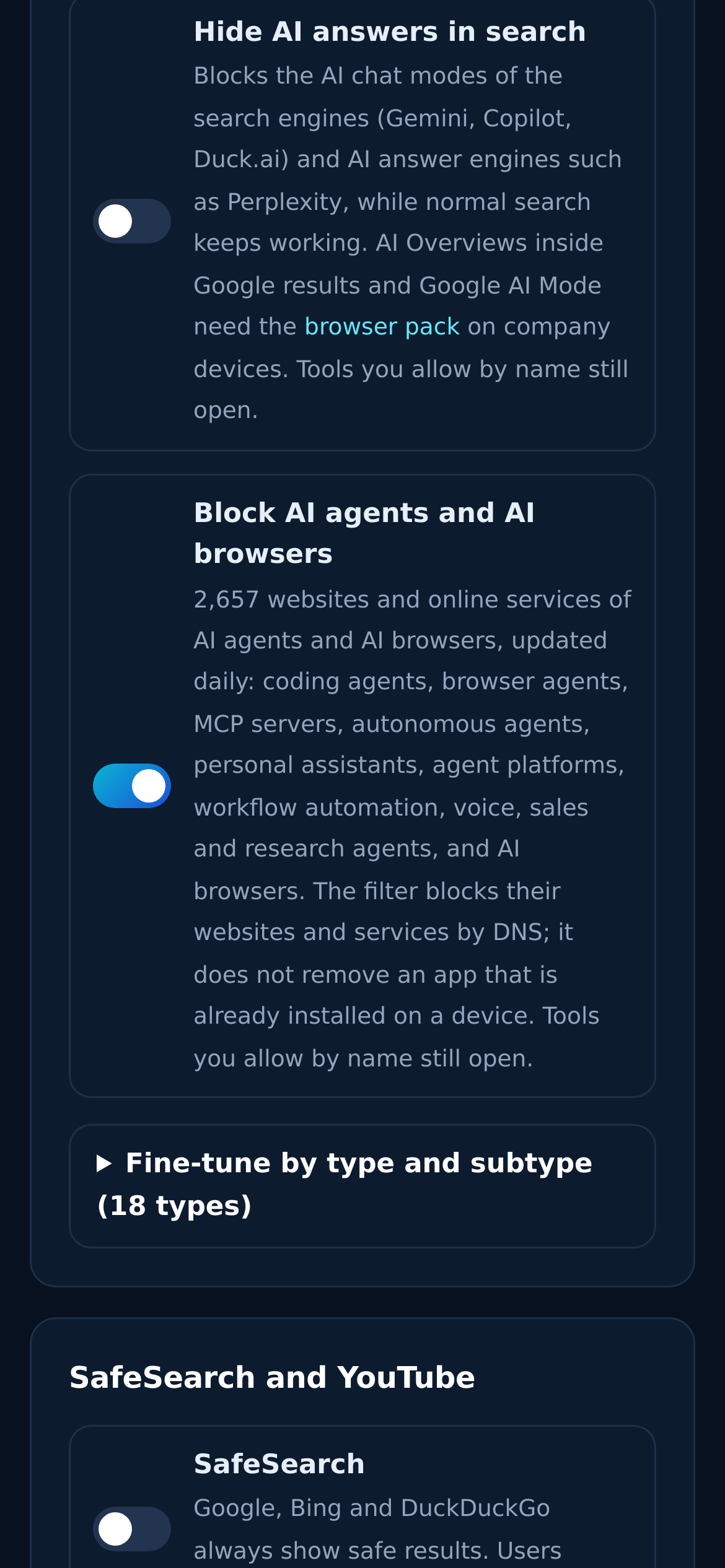
See every AI agent your networks reached
Shadow AI agents stop being a guess. The reports show which agents people tried to use, where, and what the filter did about it.
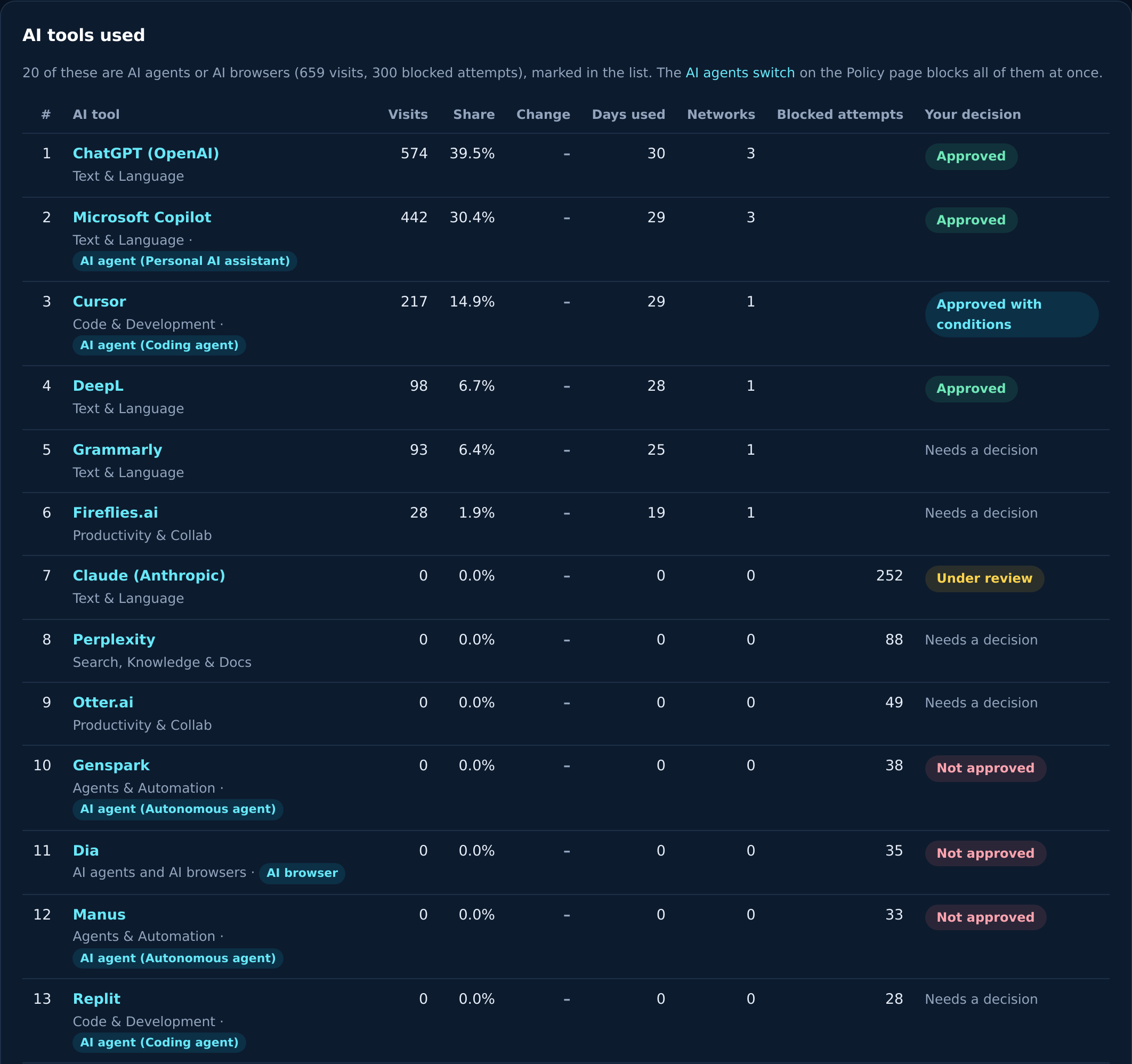
AI tools used
Every AI tool and agent by name, with its type, the networks that reached it and the rule that decided it.
Activity
Each lookup with its network, result and category, visible within a minute of the request.
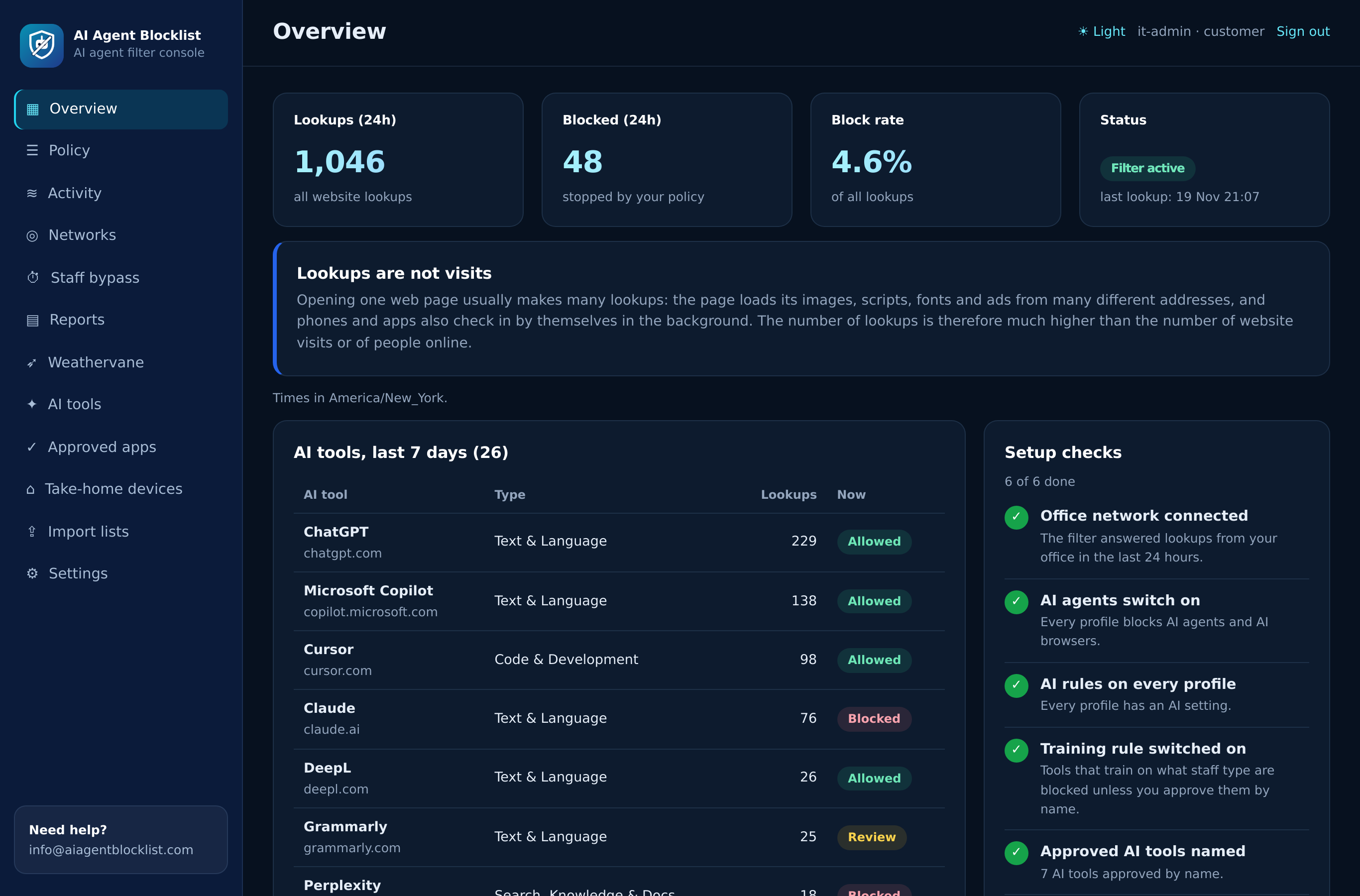
Overview
Setup checks, lookups over time and the most used AI tools, so you see at a glance that filtering runs.
Export
Download the report for your records, an audit or the next meeting about your AI policy.
Block AI agents, keep the AI you approved
Most organisations do not block every AI tool. They stop AI that acts on its own, keep the assistants they licensed, and decide on the rest over time. The filter's rules are built for that.
Approved by name always wins
A tool you approve in a profile opens on every network that uses it, whatever the other rules say. Approve your licensed coding assistant and it stays open with the agents switch on.
The AI agents switch
Blocks AI browsers and the eleven agent types above. Leave it off for a profile where agents are part of the job.
The training rule
One switch closes AI tools whose terms say they train on what users type.
Rules by AI type
Allow writing assistants, review image tools, block companion apps. Your choice per type.
Website categories
58 categories next to the AI rules, such as adult content, gambling, and VPN and proxy sites.
| Situation | How to set it up |
|---|---|
| Developers use one licensed coding assistant | Agents switch on. Approve that assistant by name. Other coding agents stay blocked. |
| Sales runs a pilot with one AI sales agent | Give the sales office its own profile and approve that agent by name there only. |
| Guest Wi-Fi | A separate profile with the agents switch on and AI tools blocked. |
| A school with student and staff networks | Agents switch on for students. Staff profile with the tools the school approved. |
| A team that builds agents for the business | Agents switch off for that team's network, on everywhere else. |
Need the policy text that goes with these settings? Start from our AI agent acceptable use policy.
Everything else in the filter
The AI agents switch is one part of a full web filter. The same plan covers AI tools, websites, offices and laptops.
Filter or files: which one fits you
The same AI agent data comes in two forms. The filter is for teams that want us to run the blocking. The files are for teams that already run their own controls.
| Question | AI Agent Filter (hosted) | AI Agent Blocklist (files) |
|---|---|---|
| What you get | A DNS filter we run, with a dashboard | Daily files for your firewall, DNS filter, MDM and browser policies |
| Who does the blocking | Our filter, with your rules | Your own tools |
| AI agent domains | Kept current for you | In every file set |
| Extension, app and package IDs | Not included | Included |
| AI tools controls and web categories | Included | Not included |
| Reports of blocked agents | In the dashboard | From your own logs |
| Price for one organisation | $99 a month or $990 a year | $99 a month or $990 a year |
| A good fit when | You have no DNS filter of your own, or want one place for AI rules and reports | You already run a firewall, DNS filter or MDM and want the data inside it |
Many organisations use both: the filter for the network, and the device files for installed apps and extensions. Compare the plans on the pricing page.
Your first week with the AI Agent Filter
A calm order that blocks agents quickly and gives teams time to ask for the AI they really need.
We connect your first office. Set our DNS addresses on one test device, then on the router.
Turn on the agents switch for one profile. Watch the AI tools report fill up.
Approve the AI tools you licensed by name. Tell staff what stays open.
Add the other offices and the guest Wi-Fi. Ask us for links for laptops that travel.
Review the report with team leads. Adjust profiles and plan the device policy step.
Who uses a hosted AI agent filter
The filter suits teams that want AI agents under control this week, without building and feeding their own lists.
Companies without a security team
One router setting and one switch. The dashboard shows what happened, so a busy IT person can answer questions from management.
Organisations with many offices
Every office in one console, each with its own profile. A change applies everywhere within seconds.
Schools and districts
Keep AI browsers and agents away from student networks while staff use approved tools. See students and AI agents.
Law, finance and health teams
A clear rule on AI that acts with client data, and a report that shows the rule held.
Teams that approved one agent
Keep the agent you chose, block the rest. Approved by name always wins.
IT providers
Running the filter for several client organisations? Tell us how many in the form and we reply with the options.
Turn on the AI agents switch this week
$99 a month or $990 a year for one organisation. Flat price, no per-user counting.
- 2,600+ AI agent domains behind one switch, updated every day
- AI tools controls, 58 web categories, dashboard and reports
- Send the form, we reply within one business day, and after the order we connect your network within one business day
Ask us or order a plan
Tell us what you need to block and where your rules live. We reply within one business day.
- Files for firewalls, DNS filters, secure web gateways, MDM and browser policies
- Updated every day as new AI browsers, agents and extensions appear
- Plans for one organisation, for MSPs and for product makers, or a hosted filter we run for you
Questions about the AI Agent Filter
What is the AI Agent Filter?
A DNS filter we run for you. Your network sends its DNS lookups to our servers, and one switch per profile blocks 2,600+ AI agent and AI browser domains that we keep current every day. It also includes the AI tools controls, 58 web categories, a dashboard and reports.
How is the filter different from the AI Agent Blocklist files?
The files are for organisations that already run a firewall, DNS filter or device management and want to load the data themselves. The filter is for teams that want us to run the blocking, with a dashboard and reports. Device identifiers such as extension and app IDs come only with the files.
Does the filter remove AI agents that are already installed?
No. A DNS filter controls which websites and services a device can reach. It stops the agent services an installed app calls, but it does not remove the app. Use your device management with the device policy files from the AI Agent Blocklist to block or remove installed AI browsers and agent apps.
Can we block AI agents but keep the AI tools we approved?
Yes. A tool you approve by name in a profile always opens, even with the AI agents switch on. Your licensed assistant stays available while other agents and AI browsers stay blocked.
What do staff see when an AI agent is blocked?
The agent's site or service does not load. On plain web pages a block page with your name gives the reason, for example AI agent (Coding agent). On HTTPS sites browsers show a connection warning unless you install our block page certificate on managed computers.
How much does the AI Agent Filter cost?
$99 a month or $990 a year for one organisation. The price is flat, with no per-user or per-device counting for your office networks.
Can the filter see what people type into AI agents?
No. The filter works on DNS. It sees which site or service a device asks for, never the page content, prompts or files.
Does the filter work on laptops away from the office?
Yes, with an encrypted DNS link for each laptop. The laptop then uses its profile's rules at home, in hotels and on hotspots. Ask us about devices away from the network when you order.
Dia, BrowserOS, Browser Use, Skyvern, Manus, Genspark, Lindy, Cline, Devin, Smithery, Composio, LangChain, AirOps, Vapi, Retell AI, 11x, Artisan and Elicit are trademarks of their respective owners. Microsoft, Microsoft 365, Intune and Edge are trademarks of Microsoft Corporation. Google, Chrome and the Google Admin console are trademarks of Google LLC. Apple is a trademark of Apple Inc. Firefox is a trademark of the Mozilla Foundation. Jamf is a trademark of its owner. Gartner is a registered trademark of Gartner, Inc.
Names are used only to identify the products discussed. AI Agent Blocklist is not affiliated with, sponsored or endorsed by these companies.